Network Access Management
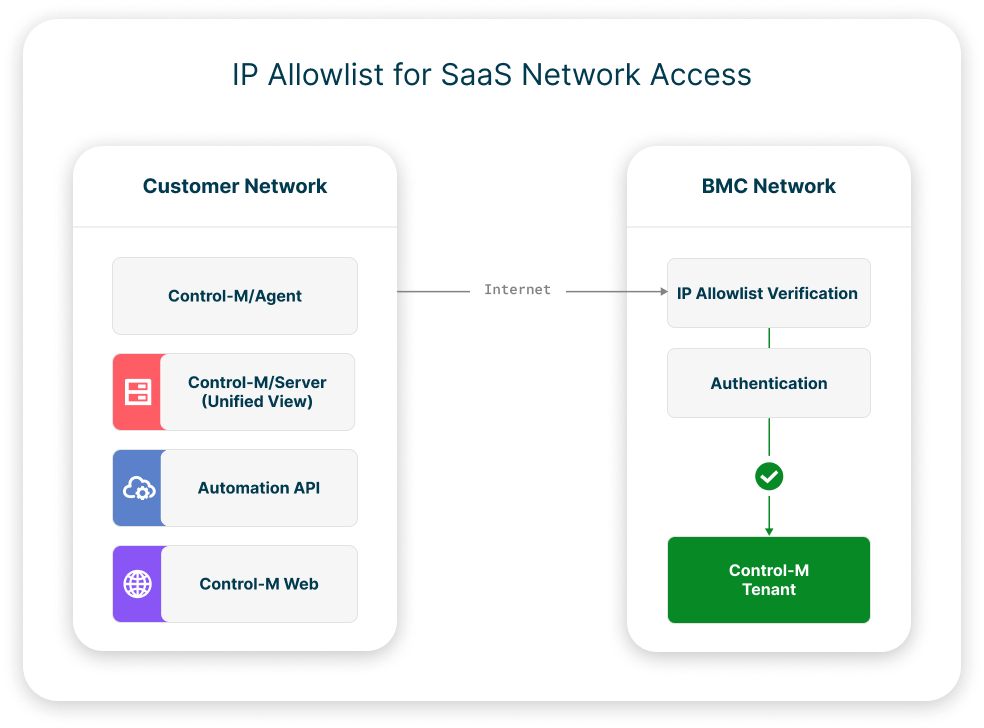
You can limit network access to your Control-M SaaS tenants with allowlists, which contain a list of IPv4 addresses that are allowed to access the endpoints of the following Control-M components:
-
Control-M/Agent (registration only)
-
Control-M/Server (registration only)
-
Control-M Automation API
-
Control-M Web
Control-M/Agent and Control-M/Server endpoint limitations are applied to future registrations, and not to existing registrations.
The following diagram demonstrates how allowlists limit network traffic to the Control-M SaaS tenant.
Allowlist Management
You can create up to 50 allowlists per Control-M SaaS tenant. Each allowlist contains a logical group of up to 15 IPv4 addresses. You can then activate or deactivate any of the defined allowlists at any time. This gives you full control over the final combination of IP addresses with access to your endpoints at any time.
All allowlist management tasks, such as creating or deleting allowlists, are available through Control-M Automation API. For more information, see IP Access Allowlist Configuration.
Lockout Prevention
The following measures and guidelines prevent and resolve network access lockout:
-
Your current IP address must be included in the allowlist if no allowlists are active and you plan to activate your first allowlist.
-
After every activation or deactivation of an allowlist, you must acknowledge the change between one and two minutes after the action. If you fail to acknowledge, the change reverts automatically.
-
If you are locked out, contact BMC Support immediately. BMC Support will disable all allowlists and remove all limitations, so that you can start over.
 YouTube
 Facebook
 LinkedIn