Control-M for Event-Driven Workflows
Control-M for Event-Driven Workflows captures events from third-party message brokers to automatically trigger Control-M workflows in real time. An Event Handler connects to external queues in the message brokers. It then consumes the messages from the queues and triggers one or more of the following Control-M actions:
-
Runs an existing folder
-
Creates and runs folders or jobs dynamically
-
Creates a Control-M event
The integration is OpenTelemetry-ready to enable third-party monitoring solutions to collect and export metrics, logs, and traces.
-
Control-M for Event-Driven Workflows does not support idempotency.
-
BMC is not responsible for the message content that you transfer to the Event Handler described in Control-M for Event-Driven Workflows Architecture.
Control-M for Event-Driven Workflows Architecture
The following diagram shows Control-M for Event-Driven Workflows architecture.
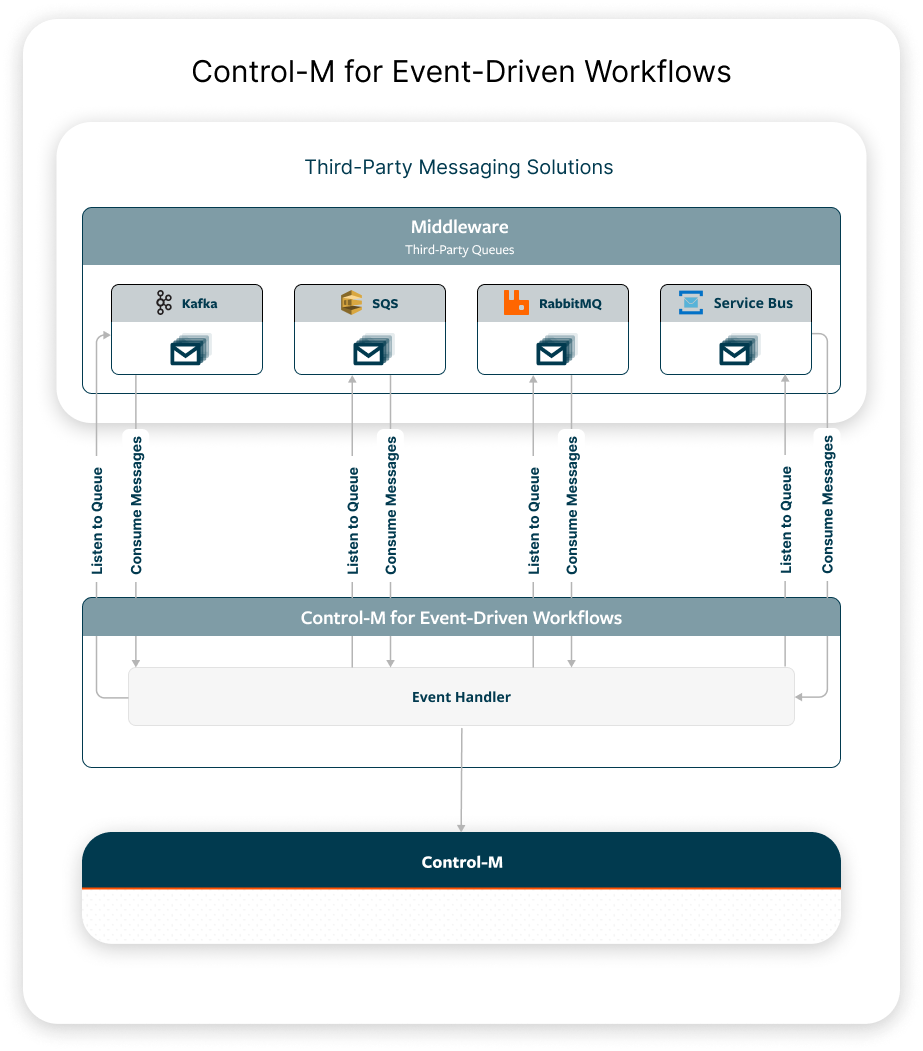
A third-party application sends a message to one or more of the following message brokers:
-
Kafka
-
Amazon SQS
-
RabbitMQ
-
Azure Service Bus
Control-M for Event-Driven Workflows contains an Event Handler, which uses a listener to detect and consume messages from the queues defined in a configuration file. The configuration file in the Event Handler defines the connection details to the relevant services and their queues, as well as the action that is triggered in Control-M. The action triggered in Control-M is defined in a template file that is referenced in the queue configuration file.
Installing Control-M for Event-Driven Workflows
This procedure describes how to install a single deployment. If you have multiple deployments, repeat this procedure for each deployment.
You must have working knowledge of Kubernetes to perform this procedure.
Before You Begin
-
Verify that you have a Kubernetes cluster configured.
-
Verify that you have access to a local host where the kubectl cli and Helm are configured.
-
Verify that Control-M Automation API 9.0.22.050 is installed, as described in Setting Up the API.
-
Verify that Control-M 9.0.22 or higher is installed.
-
Verify that one or more of the following messaging solutions are accessible from the Event Handler:
-
Kafka
-
Amazon SQS
-
RabbitMQ
-
Azure Service Bus
-
Begin
-
From your Kubernetes cluster, allocate an existing namespace or create a new one.
Run the following command to create a new namespace:
kubectl create ns <namespace>
Where:
<namespace> is a Kubernetes mechanism to isolate groups of resources that contain the configuration, templates, secrets, pods and deployments related to the Event Handler.
-
(Optional) Run the following command to set the kubectl context with the access parameters that kubectl utilizes to connect to the Kubernetes cluster:
kubectl config set-context --current --namespace=<namespace name>
Where:
<namespace> is a Kubernetes mechanism to isolate groups of resources that contain the configuration, templates, secrets, pods and deployments related to the Event Handler.
-
Create a queue configuration file named queues.yml on the local host, as described in Queue Configuration File.
-
Create Kubernetes Secrets and ensure that the queue configuration file references the keys stored in the Kubernetes Secrets, as described in Secrets.
Credentials must be provided in the queue configuration file as Kubernetes Secrets in key-value format.
-
Run the following command in the Kubernetes cluster to create a ConfigMap from the queue configuration file:
kubectl create configmap <ConfigMap name> --from-file=<queue configuration filename> --namespace=<namespace name>
Where:
-
<ConfigMap name> is the ConfigMap created from the queue configuration file.
-
<queue configuration filename> is the full path and name of the configuration file.
-
<namespace> is a Kubernetes mechanism to isolate groups of resources that contain the configuration, templates, secrets, pods and deployments related to the Event Handler.
Copykubectl create configmap your-Event-Handler-config --from-file=pathtofile/queues.yml --namespace your-namespace -
-
Create template files in a templates directory on the same local host, as described in Template Files.
The template filename must be in the following format:
<queue_name>_body.json
-
Run the following command in the Kubernetes cluster to create a ConfigMap from the template files in the template directory:
kubectl create configmap <ConfigMap name> --from-file=<template directory> --namespace=<namespace name>
Where:
-
<ConfigMap name> is the ConfigMap created from the template files in the template directory.
-
<template directory> is the full path and name of the template directory.
-
<namespace> is a Kubernetes mechanism to isolate groups of resources that contain the configuration, templates, secrets, pods and deployments related to the Event Handler.
Copykubectl create configmap your-Event-Handler-templates --from-file=pathtodirectory/templates --namespace your-namespace -
-
(mTLS only) Place your mTLS certificates and keys in a secrets directory on the same local host.
-
(mTLS only) Run the following command in the Kubernetes cluster to create a Secret from the files in the secrets directory:
kubectl create secret generic event-handler-certificates --from-file=<secrets directory> --namespace=<namespace name>
Where:
-
<secrets directory> is the directory that contains files with the secrets.
-
<namespace> is a Kubernetes mechanism to isolate groups of resources that contain the configuration, templates, secrets, pods and deployments related to the Event Handler.
-
-
Deploy the image in the Kubernetes cluster with a Helm chart, as described in Deploying the Event Handler Image with a Helm Chart.
Queue Configuration File
The queue configuration file contains the queue connection information and the actions to trigger in Control-M.
The file consists of the following sections:
-
The messaging queue information, including the queue name, message format, connection details, and actions, as described in the following:
-
Log information, as described in Log Parameters.
-
Control-M connection information, as described in Control-M Parameters.
The following example shows a queue configuration file for RabbitMQ, Kafka, Amazon SQS, and Azure Service Bus.
event_queues:
  - name: rmqueue1
    type: rabbitmq
    format: text
    connection:
      server: dba-tlv-ab2cd.bmc.com
      port: 5672
      vhost: vhost1
      credentials: RMQ_USER1
    action:
      type: setevent
      path_server: dba-tlv-w4zyz
  - name: k-events
    type: kafka
    format: yaml
    connection:
      bootstrap.servers: dba-tlv-ab2cdf.bmc.com
      group.id: dba
      auto.offset.reset: earliest
      security.protocol: SSL
      ssl.ca.location: secrets/ca.crt
      ssl.certificate.location: secrets/client.crt
      ssl.key.location: secrets/client.key
    action:
      type: runorder
  - name: sqs-orders
    type: sqs
    format: yaml
    connection:
      region: us-east-1
      queue_url: https://sqs.<region>.amazonaws.com/<account_id>/<queue_name>
      max_retries: 5
      base_delay: 10
    retries:
      profile: [30, 60, 120]
      termination: dlx
    action:
      type: ondemand
  - name: azure-orders
    type: servicebus
    format: yaml
    connection:
      queue_name: azure-function
      max_retries: 5
      base_delay: 10
      auth: connection_string
      connection_string: AZURE_SB_CONNECTION_STRING
    retries:
      profile: [ 30, 60, 120 ]
      termination: dlx
    action:
      type: runorder
logging:
  level: INFO
controlm:
  aapi: https://dba-tlv-a4bcde.bmc.com:8443/automation-api
  token: CONTROLM_TOKEN
RabbitMQ Parameters
The following example shows the RabbitMQ parameters as they appear in the queue configuration file:
name: rmqueue1
type: rabbitmq
format: text
connection:
   server: dba-tlv-ab2cdf.bmc.com
   port: 5672
   vhost: vhost1
   credentials: RMQ_USER1
action:
   type: setevent
   path_server: dba-tlv-w4xyz
The following table describes the RabbitMQ parameters.
|
Parameter |
Description |
|---|---|
|
name |
Defines the name of the queue that connects to the Message Handler. |
|
type (queue) |
Determines the type of messaging queue. Value: rabbitmq |
|
format |
Determines one of the following message types that the Message Handler consumes:
|
|
server |
Defines the RabbitMQ server in the following format: <hostname>.com |
|
port |
Determines the port number that enables you to access the RabbitMQ server. |
|
vhost |
Defines the virtual hostname that connects to RabbitMQ. Virtual hosts do not share exchanges or queues between them. |
|
credentials |
Defines the credentials for authentication. The credentials are the values of the Kubernetes Secret key prefix. credentials: RABBITMQ1 |
|
type (action) |
Determines one of the following actions to trigger in Control-M when the message is received in the queue:
The action is performed according to the template files described in Template Files. |
|
path_server |
(setevent action) Defines the path to the Control-M/Server when you create an event. This parameter is required only when the action type value is setevent. If you want the path_server value to be set to a dynamic value defined in a setevent template file, type the following: '{{ message.server }}' |
Kafka Parameters
The following example shows the Kafka parameters as they appear in the queue configuration file:
name: k-events
type: kafka
format: yaml
connection:
   bootstrap.servers: dba-tlv-ab2cdf.bmc.com
   group.id: dba
   auto.offset.reset: earliest
   security.protocol: SSL
   ssl.ca.location: secrets/ca.crt
   ssl.certificate.location: secrets/client.crt
   ssl.key.location: secrets/client.key
   ssl.key.password: mypassword
action:
   type: runorder
The following table describes the Kafka parameters.
|
Parameter |
Description |
|---|---|
|
name |
Defines the name of the queue that connects to the Message Handler. |
|
type (queue) |
Determines the type of messaging queue. Value: kafka |
|
format |
Determines one of the following message types that the Message Handler consumes:
|
|
bootstrap.servers |
Defines the Kafka broker address in following format: <host>[:<port>] |
|
group.id |
Defines a unique ID for a consumer group that consumes messages from one or more topics. |
|
auto.offset.reset |
(Optional) Defines a unique ID assigned to each message in a partition of a topic. Default: earliest |
|
security.protocol |
(Mandatory only for mTLS) Determines the security protocol to enforce two-way authentication where the client and broker verify their digital certificates. Valid Value: SSL |
|
ssl.ca.location |
(Mandatory only for mTLS) Defines the path of the Certificate Authority certificate to verify the broker certificate. The location of the certificate is secrets/<filename>. The filename must be the same as the file you placed in the secrets directory, as described in Installing Control-M for Event-Driven Workflows. |
|
ssl.certificate.location |
(Mandatory only for mTLS) Defines the path to a client certificate file in PEM format. The location of the certificate is secrets/<filename>. The filename must be the same as the file you placed in the secrets directory, as described in Installing Control-M for Event-Driven Workflows. |
|
ssl.key.location |
(Mandatory only for mTLS) Defines the location of the private key file for the certificate specified in ssl.certificate.location. The location of the key is secrets/<filename>. The filename must be the same as the file you placed in the secrets directory, as described in Installing Control-M for Event-Driven Workflows. |
|
ssl.key.password |
(mTLS) Defines the optional password to decrypt the private key file. |
|
type (action) |
Determines one of the following actions to trigger in Control-M when the message is received in the queue:
The action is performed according to the template files described in Template Files. |
|
path_server |
(setevent action) Defines the path to the Control-M/Server when you create an event. This parameter is required only when the action type value is setevent. If you want the path_server value to be set to a dynamic value defined in a setevent template file, type the following: '{{ message.server }}' |
Amazon SQS Parameters
The following example shows the Amazon SQS parameters as they appear in the queue configuration file:
name: sqs-orders
type: sqs
format: yaml
connection:
   region: us-east-1
   queue_url: https://sqs.<region>.amazonaws.com/<account_id>/<queue_name>
   max_retries: 5
   base_delay: 10
   retries:
      profile: [30, 60, 120]
      termination: dlx
action:
   type: ondemand
The following table describes the Amazon SQS parameters.
|
Parameter |
Description |
|---|---|
|
name |
Defines the name of the queue that connects to the Message Handler. |
|
type (queue) |
Determines the type of messaging queue. Value: sqs |
|
format |
Determines one of the following message types that the Message Handler consumes:
|
|
region |
Determines the AWS region where the queue is located. us-east-2 |
|
queue_url |
Defines the unique SQS queue URL that is used to send, receive, and delete messages. https://sqs.eu-west-2.amazonaws.com/123123123/TestQueue.fifo |
|
max_retries |
(Optional) Defines the maximum numbers of times to try to reconnect to the queue if the connection fails. |
|
base_delay |
(Optional) Defines the delay between the attempts to reconnect to the queue if the connection fails. |
|
profile |
(Optional) Defines the connection retry intervals in seconds. If the profile parameter value is [30, 60, 120], the Message Handler first retries to connect after 30 seconds, then after 60 seconds, and then after every 120 seconds. |
|
termination |
(Optional) Determines how to terminate the connection retry, as follows:
|
|
type (action) |
Determines one of the following actions to trigger in Control-M when the message is received in the queue:
The action is performed according to the template files described in Template Files. |
|
path_server |
(setevent action) Defines the path to the Control-M/Server when you create an event. This parameter is required only when the action type value is setevent. If you want the path_server value to be set to a dynamic value defined in a setevent template file, type the following: '{{ message.server }}' |
Azure Service Bus Parameters
The following example shows the Azure Service Bus parameters as they appear in the queue configuration file:
name: azure-orders
type: servicebus
format: yaml
connection:
   queue_name: azure-function
   auth: connection_string
   connection_string: AZURE_SB_CONNECTION_STRING
   max_retries: 5
   base_delay: 10
retries:
   profile: [30, 60, 120]
   termination: dlx
action:
   type: runorder
The following table describes the Azure Service Bus parameters.
|
Parameter |
Description |
|---|---|
|
name |
Defines the name of the queue that connects to the Message Handler. |
|
type (queue) |
Determines the type of messaging queue. Value: servicebus |
|
format |
Determines one of the following message types that the Message Handler consumes:
|
|
queue_name |
(Optional) Defines the actual name of the queue in Azure Service Bus. The name might be different from the name parameter that is listed in the queue configuration file. |
|
max_retries |
(Optional) Defines the maximum numbers of times to try to reconnect to the queue if the connection fails. |
|
base_delay |
(Optional) Defines the delay between the attempts to reconnect to the queue if the connection fails. |
|
auth |
Determines one of the following authentication methods:
Default: connection_string |
|
connection_string |
(Mandatory only for connection string authorization type) Defines the credentials for authentication. The credentials are the values of the Kubernetes Secret key prefix. Default: AZURE_SB_CONNECTION_STRING connection_string: CUSTOM_CONNECTION_STRING |
|
namespace |
(Mandatory only for shared access key authorization type) Defines the Azure Service Bus namespace. namespace: mybus.servicebus.windows.net |
|
shared_access_key_name |
(Mandatory only for shared access key authorization type) Defines the name of the primary shared key from the Azure Service Bus queue level. shared_access_key_name: RootManageSharedAccessKey |
|
shared_access_key |
(Mandatory only for shared access key authorization type) Defines the value of the Kubernetes Secret key where the shared access key value is stored. shared_access_key: AZURE_SB_SHARED_ACCESS_KEY |
|
profile |
(Optional) Defines the connection retry intervals in seconds. If the profile parameter value is [30, 60, 120], the Message Handler first retries to connect after 30 seconds, then after 60 seconds, and then after every 120 seconds. |
|
termination |
(Optional) Determines how to terminate the connection retry, as follows:
|
|
type (action) |
Determines one of the following actions to trigger in Control-M when the message is received in the queue:
The action is performed according to the template files described in Template Files. |
|
path_server |
(setevent action) Defines the path to the Control-M/Server when you create an event. This parameter is required only when the action type value is setevent. If you want the path_server value to be set to a dynamic value defined in a setevent template file, type the following: '{{ message.server }}' |
Log Parameters
The following example shows the log parameters as they appear in the queue configuration file:
logging:
  level: INFO
The following table describes general configuration file parameters.
|
Parameter |
Description |
|---|---|
|
level |
Determines one of the following log levels from most to least detailed:
|
Control-M Parameters
The following example shows the Control-M parameters as they appear in the queue configuration file:
controlm:
  aapi: https://dba-tlv-a4bcde.bmc.com:8443/automation-api
  token: CONTROLM_TOKEN
The following table describes general configuration file parameters.
|
Parameter |
Description |
|---|---|
|
aapi |
Defines the Control-M endpoint to connect to Control-M. |
|
token |
Defines the API token set in a Secret. |
Secrets
Secrets are the credentials provided as Kubernetes Secrets in key-value format that give you access to the queues and Control-M. The queue configuration file references the keys stored in the Kubernetes Secrets or an external vault.
The following examples show the commands to create a Kubernetes Secret for the different queues:
-
RabbitMQ
Copykubectl create secret generic rabbitmq1-credentials \
--from-literal=RABBITMQ1_USER='queue_user' \
--from-literal=RABBITMQ1_PASS='queue_secret' -
Kafka
Copykubectl create secret generic event-handler-certificates --from-file=<secrets directory> -
Amazon SQS
Control-M for Event-Driven Workflows supports AWS Default Credential Provider Chain. If you run Control-M Event-Driven Workflows in AWS and the Amazon Pod Identity is set for the Event Handler pods, you do not need to create a secret.
Copykubectl create secret generic sqs-credentials \
--from-literal=AWS_ACCESS_KEY_ID='<access key ID>' \
--from-literal=AWS_SECRET_ACCESS_KEY='<secret>' -
Azure Service Bus:
-
The following example is for connection string authorization:
Copykubectl create secret generic asb-credentials \
--from-literal=AZURE_SB_CONNECTION_STRING='Endpoint=sb://<namespace>.servicebus.windows.net/;SharedAccessKeyName=<keyname>;SharedAccessKey=<secret>;EntityPath=<azure-function>' -
The following example is for shared access key authorization:
Copykubectl create secret generic asb-credentials \
--from-literal=AZURE_SB_SHARED_ACCESS_KEY=<secret access key> -
The following example is for service principal authorization:
Control-M for Event-Driven Workflows supports Azure Identity DefaultAzureCredential. If you run Control-M Event-Driven Workflows in a Kubernetes cluster with Azure Workload Identity enabled, you do not need to create a secret.
Copykubectl create secret generic azure-credentials \
--from-literal=AZURE_CLIENT_ID=<client-id> \
--from-literal=AZURE_CLIENT_SECRET=<client-secret> \
--from-literal=AZURE_TENANT_ID=<tenant-id>
-
The following example shows the command to create a Kubernetes Secret for Control-M:
kubectl create secret generic ctm-credentials --from-literal=CONTROLM_TOKEN='<AAPI token>'Template Files
The template files are written in Jinja and contain the detailed information in REST API syntax required to perform the Control-M actions defined in the queue configuration file. For information about the various Jinja commands, see the Jinja documentation.
The template files are located in a dedicated template directory.
Each template filename must have the following format:
<filename>_body.json
Where:
<filename> is the queue name that appears in the queue configuration file.
The following examples show template files for the different Control-M actions:
-
runorder: Orders an existing folder with the run order API command, as described in run order.
Copy{
"ctm": "{{message.server}}",
"folder": "{{message.folder_name}}",
"hold": "false",
"ignoreCriteria": "true",
"independentFlow": "true",
"variables": [
{ "var1": "{{ message.var1 }}"},
{# Line below demonstrates how to make field "sender" optional - processing would otherwise fail if it was missing #}
{"origin": "external kafka agent {{ message.sender | default ("unknown") }}"}
]
} -
setevent: Creates a Control-M event with the run event::add API command, as described in .
Copy{
"name": "{{ message }}",
"date": "{{ "ODAT" }}"
} -
ondemand: Runs folders or jobs with the run API command, as described in run ondemand.
Copy{
"Kubernetes_manualSelector" : {
"Type" : "Folder",
"Variables" : [ {
"EXTERNAL_ID" : "{{ message.correlation_id }}"
} ],
"ControlmServer" : "{{ message.server }}",
"Description" : "Manual selector",
"OrderMethod" : "Manual",
"SubApplication" : "KBN Plugin",
"CreatedBy" : "emuser",
"Application" : "IFRobotTesting",
"DaysKeepActiveIfNotOk" : "1",
"When" : {
"RuleBasedCalendars" : {
"Included" : [ "EVERYDAY" ],
"EVERYDAY" : {
"Type" : "Calendar:RuleBased",
"When" : {
"DaysRelation" : "OR",
"WeekDays" : [ "NONE" ],
"MonthDays" : [ "ALL" ]
}
}
}
},
"Manual_Selector" : {
"Type" : "Job:Kubernetes",
{# block below from %raw to %endraw is content we don't want Jinja to interpret (because of double curly-braces) #}
{% raw %}
"Job Spec Yaml" : "apiVersion: batch/v1\nkind: Job\nmetadata:\n name: selectorjob-{{job_yaml_file_params:orderid}}\n labels:\n bmc.controlm.orderid: \"{{job_yaml_file_params:orderid}}\"\n bmc.controlm.runno: \"{{job_yaml_file_params:runno}}\"\nspec:\n manualSelector: true\n completions: 1\n parallelism: 1\n selector:\n matchLabels:\n bmc.controlm.orderid: \"{{job_yaml_file_params:orderid}}\"\n bmc.controlm.runno: \"{{job_yaml_file_params:runno}}\"\n template:\n metadata:\n labels:\n bmc.controlm.orderid: \"{{job_yaml_file_params:orderid}}\"\n bmc.controlm.runno: \"{{job_yaml_file_params:runno}}\"\n spec:\n nodeSelector:\n kubernetes.io/os: linux\n imagePullSecrets:\n - name: dockerhub-ctmb2b-cred\n containers:\n - name: demo-job\n image: perl\n command: [\"perl\", \"-E\", 'STDOUT->autoflush(1); $str = \"The quick brown fox jumps over the lazy dog -50-\"; for ($i = 1; $i <= 3; $i++) { printf \"%04d $str \\n\", $i; sleep(5) }']\n imagePullPolicy: IfNotPresent\n securityContext:\n capabilities:\n drop:\n - ALL\n allowPrivilegeEscalation: false\n restartPolicy: Never\n securityContext:\n seccompProfile:\n type: RuntimeDefault\n backoffLimit: 4\n",
"ConnectionProfile" : "CP-OPENSHIFT-ARBITRARY",
"Job Spec Type" : "Local file",
"Job Spec Parameters" : "{%4E\"orderid\":\"%%ORDERID\",%4E\"runno\":\"%%RUNCOUNT\"%4E}",
{% endraw %}
"Get Pod Logs" : "Get Logs",
"OS Exit Code" : "No print",
"Job Cleanup" : "Delete Job",
"SubApplication" : "KBN Plugin",
"Host" : "openshift-arbitrary",
"CreatedBy" : "oci-user",
"Description" : "Kubernetes Job with a custom matchSelector",
"RunAs" : "oci-user",
"Application" : "IFRobotTesting",
"DocumentationFile" : {
"Path" : "/home/controlm",
"FileName" : "installed-versions.txt"
},
"When" : {
"WeekDays" : [ "NONE" ],
"Months" : [ "NONE" ],
"MonthDays" : [ "NONE" ],
"DaysRelation" : "OR"
},
"eventsToWaitFor" : {
"Type" : "WaitForEvents",
"Events" : [ {
"Event" : "COKE_FLOW_{{ message.correlation_id }}"
} ]
},
"eventsToDelete" : {
"Type" : "DeleteEvents",
"Events" : [ {
"Event" : "COKE_FLOW_{{ message.correlation_id }}"
} ]
}
}
}
}
Deploying the Event Handler Image with a Helm Chart
This procedure describes how to deploy the Event Handler image in a Kubernetes cluster. You must first add the BMC-provided Helm chart repository for the Event Handler to your Kubernetes environment and then install the Helm chart.
Working knowledge of Kubernetes is required to perform this procedure.
Begin
-
From your Kubernetes command line, run the following command to add a repository named controlm:
helm repo add controlm-events https://controlm-charts.s3.us-west-2.amazonaws.com/event-driven/
If you do not have Internet access from the host where you plan to run the Helm installation, do the following:
-
On a machine with Internet access, use the following URL to obtain a compressed TGZ file of the Helm chart:
https://controlm-charts.s3.us-west-2.amazonaws.com/controlm-event-handler.tgz
-
Copy the TGZ file to the host where you plan to run the Helm installation.
-
Skip to the helm install command step. In this command, specify the pathname of the controlm-event-handler.tgz file instead of controlm/controlm-event-handler (the path to the chart in the repository).
-
-
Run the following command to ensure that the controlm repository is listed as one of your repositories:
helm repo list
-
Run the following command to list the charts within the new controlm repository:
helm search repo controlm
The chart for the Event Handler installation is named controlm-event-handler.
-
Do one of the following:
-
Run the helm install command with the parameter values that you want to set, as described in Helm Control-M Event Handler Parameters.
Copyhelm install controlm-events controlm-event-handler
--set queuesConfig=<name of ConfigMap created for the queue configuration file>
--set controlmTemplates=<name of ConfigMap for queue templates)
--set credentialSecrets="{list of secrets}"
--set secretVolumes="{event-handler-certificates}" -
Run the helm install command with a reference to a user values file:
helm install controlm-events events/control-event-handler -f ./params.yml
The following example shows a user values file:
CopycontrolmTemplates: eventhandler-templates
credentialSecrets:
- eventhandler-creds
- eventhandler-sqs
secretVolumes:
- event-handler-certificates
image:
pullPolicy: Always
repo: "private-repo/event-handler"
tag: "latest"
pullSecrets:
- name: "dockerhub-secret"
queuesConfig: eventhandler-config
replicas: 1
Deployment might take several minutes. To monitor the status of the rollout, run the following command:
kubectl rollout status deployment/<releaseName> -n event-handler
-
Helm Control-M Event Handler Parameters
The following table lists the parameters that you set when you deploy the Event Handler image of the Helm chart in Kubernetes.
-
For an online list of the parameters that you can set during Helm chart installation, run the following command:
helm show values controlm/controlm-event-handler
-
For more information about Kubernetes resources that are the basis of certain parameters, use the kubectl explain command, such as the following:
kubectl explain statefulset.spec.template.spec.affinity
-
Object-type and array-type values must be defined in JSON format (with the --set-json switch). If you obtain them in YAML format, convert them to JSON. You can use the JQ command on Linux for this conversion.
|
Parameter |
Description |
|---|---|
|
controlmTemplates |
Defines the ConfigMap created from the template directory during the installation procedure. Type: String |
|
credentialSecrets |
Defines a list of secrets with credentials to access the queues and Control-M Automation API. Type: Array |
|
secretVolumes |
Defines a list of secrets with certificates and TLS keys. Type: Array |
|
image.pullPolicy |
(Optional) Determines whether to update the image by pulling a new version of the image when the kubelet launches a container. Values:
Default: IfNotPresent Kubernetes resource: statefulset.spec.template.spec.containers.imagePullPolicy Type: String |
|
image.repo |
(Optional) Defines the path to the container image repository in the following format: <registry hostname>/<account name>/<repository name> If you do not define a registry hostname, Kubernetes assumes the Docker public registry (in the Docker Hub). Kubernetes resource: statefulset.spec.template.spec.containers.image Type: String |
|
image.tag |
(Optional) Defines the tag associated with the image. Tags enable you to identify different versions of the same series of images. Kubernetes resource: statefulset.spec.template.spec.containers.image Type: String |
|
image.pullSecrets |
(Optional) Defines a secret (password) to access a private registry. --set image.pullSecrets"[0]".name=<secret_name> Define a secret if you created your own non-default container image, as described in Docker Container Image. If so, you might need a secret in your cluster. To create the secret, see the Kubernetes documentation. Kubernetes resource: statefulset.spec.template.spec.imagePullSecrets Type: Array |
|
queuesConfig |
Defines the ConfigMap created from the queue configuration file located in the configuration folder during the installation procedure. Type: String |
|
replicas |
Determines the number of pods to run. Default: 2 Kubernetes resource: statefulset.spec.replicas Type: Integer |
|
pod.nodeSelector |
(Optional) Defines node labels for the NodeSelector to ensure that the pod is scheduled on the nodes. Default labels:
Kubernetes resource: statefulset.spec.template.spec.nodeSelector Type: Array |
 YouTube
 Facebook
 LinkedIn