CITKit Overview
The following sections describe basic CITKit concepts and resources:
System Architecture
An application that uses CITKit has available the same Control D/WebAccess Server functionality that is available through a Control D/WebAccess Server interface displayed in a Web browser. Third-party applications can use CITKit to send requests to Control D/WebAccess Server. Control D/WebAccess Server passes them to the Control D environment for processing. Responses are returned along the same route.
Applications that use CITKit can send requests to Control D repositories through any type of platform.
Communication Modes
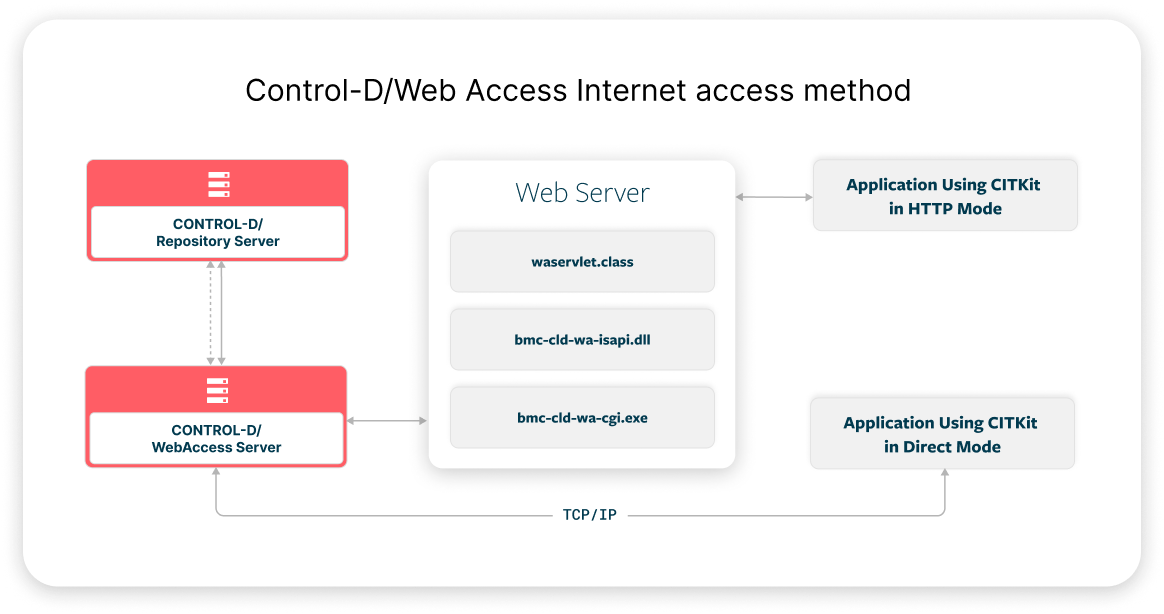
Your application uses the CITKit to send requests to either an Internet access method, or directly to Control D/WebAccess Server, using one of following connection modes.
-
HTTP Mode: Relays information between your application and an Internet access method (such as CGI, ISAPI. or Servlet). The request is submitted to Control D/WebAccess Server by the selected Internet access method component (bmc-ctd-wa-cgi.exe, bmc-ctd-wa-isapi.dll, or waservlet.class). This is the recommended mode if the Control D/WebAccess Server resides behind a firewall.
-
Direct Mode: Relays information between your application and Control D/WebAccess Server. This is usually the quicker mode.
Data Flow
Requests from CITKit to the Control D/WebAccess Server (when using Direct mode) or to the Internet access method (using HTTP mode) are passed via Control D/WebAccess Server, which forwards them to the correct Control D component for processing. Returned data is returned along the same route.
The following figure shows the CITKit Data Flow:
Request Processing
Requests sent to Control D/WebAccess Server must include as a parameter a pre-defined Control D/WebAccess Server request type.
Upon receiving a request, CONTROL D/WebAccess Server performs the following:
-
Control D/WebAccess Server parses the request to validate its contents.
-
Control D/WebAccess Server uses the information in the Request Type to formulate a specific request.
-
This formulated request is processed according to the request parameters.
-
Data retrieved as a result of the request is formatted in an internal tree structure.
-
Using the request parameters and data format, Control D/WebAccess Server determines how to generate the information that is returned to your application. Data can be returned as HTML, XML, or in binary form.
Programming Environments
CITKit supports programming in Java and in Automation-based languages. CITKit supports the following languages:
-
A pure Java application (or applet or Servlet) or JSP files (Java code is embedded inside an HTML file)
-
Automation-based languages that create and manipulate ActiveX COM objects, such as the following:
-
ASP (with embedded VBScript or JScript code that uses CITKit Automation inside the ASP files)
-
Visual Basic
-
Visual Basic for Applications
-
VBScript
-
JScript
-
Visual C++
-
C#
-
Development and Deployment Environments
Automation is supported only for Microsoft Windows computers. Therefore, Automation-based applications can be developed and run only on Windows.
Java applications that use CITKit can be developed and run on any computer that can run a Java Virtual Machine (JVM), such as Microsoft Windows or Unix.
Further Documentation
The following additional CITKit documentation is available:
-
The Control-D Content Integration Toolkit Reference Guide describes the CONTROL D/WebAccess Server functions and methods available to CITKit. This guide is distributed in the CITKit_Reference_Guide folder both as a collection of HTML files (CITKit_Reference_Guide.zip) for UNIX users, and as a Windows help file (CITKit_Reference_Guide.chm).
-
The sample folder contains code samples that demonstrate how to use CITKit. These code samples are written in ASP, Java, JSP, and Visual Basic. To learn how the CITKit library communicates with Control D repositories, it is recommended that you view the various code sample files with a text editor. The code sample files contain code comments that clarify the CITKit library usage.
 YouTube
 Twitter
 Facebook
 LinkedIn