Control-M SSL Configuration
Control-M works with the Secure Sockets Layer (SSL) and Transport Layer Security (TLS) protocols, which enable Control-M components to securely communicate with each other. SSL for Control-M authenticates and secures communications between one or more of the following:
-
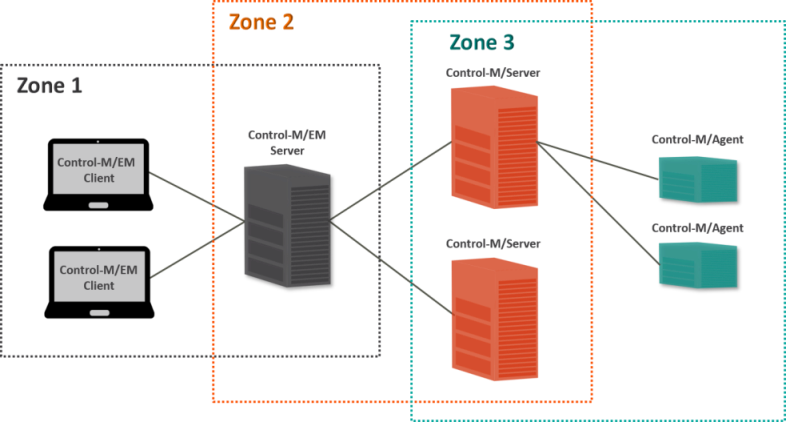
Control-M Web Server and its Clients, as described in Zone 1 SSL Configuration.
-
Control-M/EM server and Control-M/Servers, as described in Zone 2 and 3 SSL Configuration.
-
Control-M/Server and Agents, as described in Zone 2 and 3 SSL Configuration.
-
Control-M/EM and the LDAP Server, as described in LDAP SSL Configuration.
Depending on your setup, you can enable security for the following components:
-
Control-M Self Service, as described in Zone 1 SSL Configuration.
-
Control-M Workload Change Manager (WCM), as described in Zone 1 SSL Configuration.
-
Control-M MFT, as described in Configuring Control-M MFT for an Alternative CA.
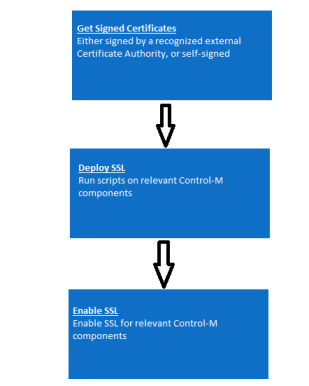
To configure SSL in your environment, you must do the following:
-
Get Signed Certificates: Signed certificates enable secure communication via SSL/TLS protocols. Control-M components support only PEM file types, which are ASCII-encoded X.509 certificates. BMC recommends that you replace the existing certificates with your own certificates, which are signed by a recognized Certificate Authority (CA). You can either get the signed certificates from your security administrator or create your own, as follows:
-
Get Certificates from Your Security Administrator: Obtain a PKCS#12 keystore
 A Public-Key Cryptography Standards (PKCS) #12 keystore is a password-protected, encrypted file that contains a private key, its matching SSL/TLS certificate, and optionally a certificate chain of intermediate and root Certificate Authority (CA) certificates. Control-M components use this keystore to authenticate each other and encrypt the data that they exchange over SSL/TLS, which protects workload data in transit and makes sure that each component connects only to trusted components. or a private key, signed certificate, and certificate of the root CA in PEM file format. This last file must also contain the certificate chain from the certificate that signed your certificate to the root CA certificate, if required.
 -
Get Certificates with a CSR File: Obtain a signed certificate from a recognized CA using a Certificate Signing Request (CSR) file. If the server certificate is issued by an intermediate CA that has a certificate that is trusted by a root CA (whether directly or by a chain), you must obtain the certificate chain from the CA.
-
-
Deploy SSL: To create an SSL policy, you must deploy the PKCS#12 keystore to the relevant Control-M components, as described in Deploying a New Keystore in Zone 2 and 3.
-
Enable SSL: Enable SSL for relevant Control-M components.
The following diagram shows the multiple ways that you can configure SSL in a Zone-based environment:
 YouTube
 Facebook
 LinkedIn